Queue Now and Queue Group Now
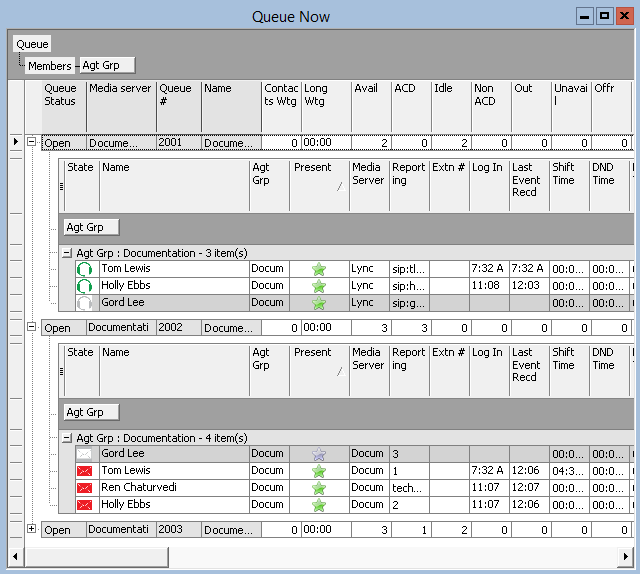
The Queue Now monitor enables supervisors to view queue statistics in real time, as well as expand individual queues in the monitor to view statistics on each queue’s associated member agents. When you expand the Queue Now monitor to display the Name column, the monitor also displays member presence in the queue. Presence is indicated by a colored star in the Present column. A green star indicates the member is present in the queue. A gray star indicates the member is not present in the queue.
The Queue Group Now monitor enables supervisors to view aggregated statistics for Reporting and Unified queue groups in real-time, as well as expand individual queue groups in the monitor to view statistics for the queue group’s associated queues.
On the Queue Now monitor, you can specify which columns of statistics are displayed, rearrange columns, and sort individual columns in ascending or descending order. You can expand a queue and view statistics on the members associated with the queue. (See the following figure.)
- Contact Center Client updates Longest Waiting statistics every fifteen seconds, or more frequently as records are received from the gateway.
- If the gateway has not updated Mitel CX with real-time statistics for Contacts Waiting and Agents Available within the last 90 seconds, question marks display in place of these statistics.
- Agents present in the queue and idle whose extensions are ringing are included in 'Available' statistics. Agents whose extensions are ringing are not included in Unavailable statistics.
- The Average Handling Time is the Average interaction Time plus the Average Hold Time. If the call is put on hold, transferred, or conferenced, these times are added to the Average Handling time value.
- If an agent fails to answer an ACD call after X seconds or X rings, the system puts the agent into System Make Busy. The system then re-queues the call, in the same queue, and offers it to the next available agent.
The abandoned media column in the Interactive Visual Queue monitor displays all abandoned calls. The abandoned column in the Queue Now monitor does not include short abandons as abandoned calls. Because of this difference, you may notice discrepancies between the abandoned call information in these two monitors.