Using the On-Screen Keypad
You can use the on-screen keypad to
-
perform call handling functions
-
dial numbers
The on-screen keypad can be set (pinned  ) to always remain on top of the other windows.
To display the on-screen keypad
-
Select the Keypad
button from the Tools area at the top of the screen.
The on-screen keypad is displayed. You can also launch the keypad tutorial from here.
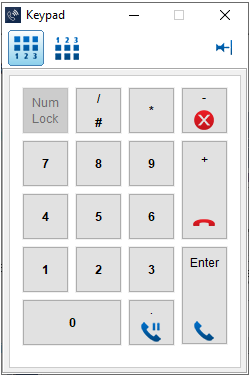
You can display the Keyboard keypad format (with 1,2,3 at the bottom)  or the telephone keypad format (with 1,2,3 at the top)
  .
.
↑