MiCollab Client
The MiCollab UC client provides users with a single access point for all their business communication and collaboration needs. It converges the call control capabilities of the MiVoice MX-ONE communications platforms with contact management, presence status and collaboration applications, to simplify and enhance real-time communications. With access to presence and availability details of everyone within the organization (on or off the premises) employees are able to quickly determine if the person they need to connect with are available for a quick chat or live interaction, helping make each and every interaction as productive as possible.
Plus, at any point during the interaction employees utilizing desktop-based MiCollab UC clients can escalate to a full web collaboration session with a push of a button (selection of an Icon).
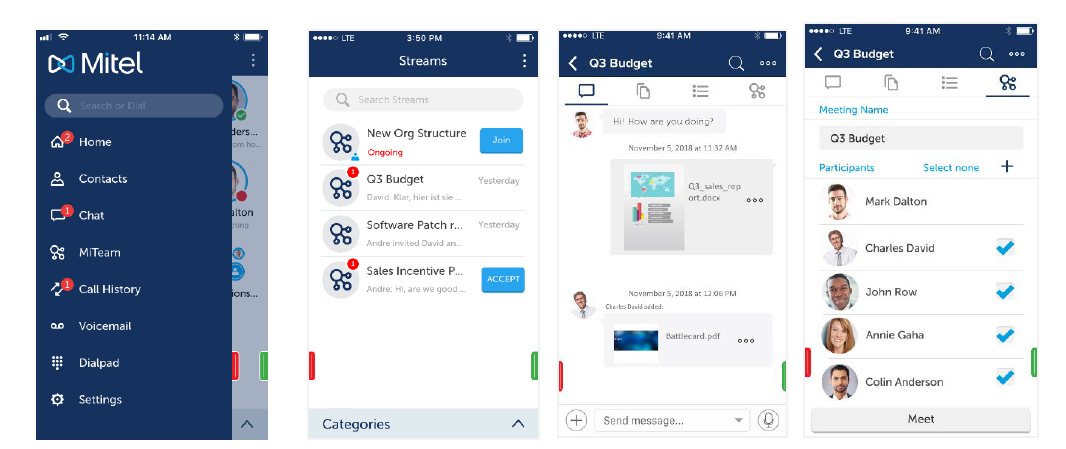
Users of both desktop-based and mobile-based clients can access team collaboration services via the embedded MiTeam service offering users access to virtual workspaces where they can post messages, share content, assign tasks, and start instant group conferences. MiTeam is an optional subscription-based service that is available via the MiTeam Uplift option.
Desktop Softphone, Web Portal, and Mobile Client Support
PC Softphone:provides users with access to MiVoice MX-ONE features from a stationary PC, a remote PC or laptop, or smart phone. When remotely connected to a MiVoice MX-ONE platform within the office or via a secure network connection, users can make and receive calls, audio, video as though they were on the corporate network.
Web Portal:provides a web-based interface to a key subset of client features, perfect for users who are remote from the office. Through the support of WebRTC web users can also benefit from true softphone services, similar to what is provided via the traditional clients, from inside as well as from outside the company network.
Mobile Clients:available for iPhone and Android phones provide users with access to core UC functions and mid-call control features, such as hold, transfer & conference on PBX anchored calls when deployed with the MiVoice MX-ONE call manager.
Key Features and Functionality
- Simplified Call Management and Logging: The MiCollab client provides users with the advanced call management features of the MiVoice MX-ONE communications platform. The server logs incoming calls for the MiCollab clients, even when the MiCollab client software is not running. When a MiCollab client is restarted, the server updates the client with all the cached call log information since the last session. It also stores frequently dialed phone numbers and allows users to call these numbers from a drop-down menu.
- Presence and Availability: This feature informs you of a person’s availability – whether they are on the phone, away from their desk, or available for a secure instant chat.
- Contact Grouping: Corporate, Personal and Contact groups are unified into a single portal enabling users to quickly access all corporate contacts and personal contacts from their mobile device or personal Outlook contact directories, and those they have deemed as favorites. Organizations have the capacity to create additional groups including the ability to import corporate contacts, who are not equipped with a Mitel telephony solution, directly from Active Directory.
- Through Off-board LDAP: support users can be given access to extended directories as suited for the individual company’s needs. In addition, this DB can be used to provide name presentation for external calls coming in.
- Dynamic Status: Provides the user with an easy method of specifying IM, presence, and call routing options when showing a specific Dynamic Status. The status can be changed from within MiCollab UC client or it can be automatically updated based on the user’s Microsoft Outlook calendar information.
- Visual Voice Mail: Users are provided with an intuitive interface to view and listen to Mitel NuPoint Unified Messaging™ (UM) voice mail messages. Alternatively, MiCollab Advanced Messaging can be set-up to offer the corresponding functionality.
- Corporate Chat/IM: Facilitates secure instant messaging between colleagues through single or multi-party chat.
- MiTeam: Provides virtual (persistent) workspaces for team-based projects to meet and discuss all details associated with the project, including the ability to share content, annotate shared content, conduct collaborative meetings, and assign and track tasks associated with project activities and milestones. MiTeam team collaboration capabilities are integrated into the different MiCollab UC clients – mobile, Web, PC, and Mac.
- Guest access to MiTeam streams can be provided to internal as well as to external users.
Supported Integrations
- Integration with Mitel Teleworker Solution: Teleworker allows users to access their corporate voice network through the MiCollab SIP softphone, from home or on the road, without the need for a virtual private network (VPN) connection. Mitel’s MBG provides security via its session border control services.
- Integration with multi-device ring groups on MiVoice MX-ONE. A MiCollab client user who also has multi-device support can answer an incoming call directed to their desk phone or on a device of their choice – for example, on a cell phone, SIP softphone or home phone. When the call is answered, the MiCollab client application changes the user’s telephony presence to “off-hook.” This enables MiCollab client to display the correct telephony status for a user, regardless of whether the call was answered on a user’s desk phone, softphone, or mobile device.
- Integration with MiCollab (Audio, Web, and Video) Conferencing: integration with this service enables users to escalate a call or chat to a full collaboration session with the click of a button.
- Integration with Business Applications: integrates with popular communications and productivity tools such as Outlook and Microsoft Office. Users can dial from their Outlook contact list, integrate their Dynamic Status with their Outlook calendar, and click-to-dial within Outlook contact cards.
Possible to cross launch of third party video collaboration apps from the MiCollab clients.