Redsky´s MyE911 client - InAttend Client
The RedSky´s MyE911 Client is required to be used with InAttend Client, because it offers the InAttend users the option of changing their location.
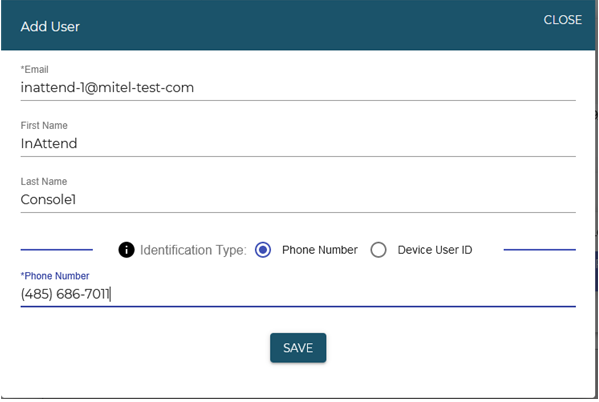
For an InAttend Client user to be created in the RedSky´s portal, a valid email address is required.
In the RedSky portal, go to Users and then select Add User. Add the required information.
InAttend Client requires the RAY BAUM emergency private queue function must be enabled or the InAttend Client to be able to receive emergency callback calls. Refer to the InAttend documentation for instructions on how to set it up.
The RAY BAUM emergency private queue needs to be reached from outside by a full DID number and it needs to present a full DID number to RedSky when an emergency call is placed. It can be achieved by MX-ONE number conversion as by any other extension in the MX-ONE system.
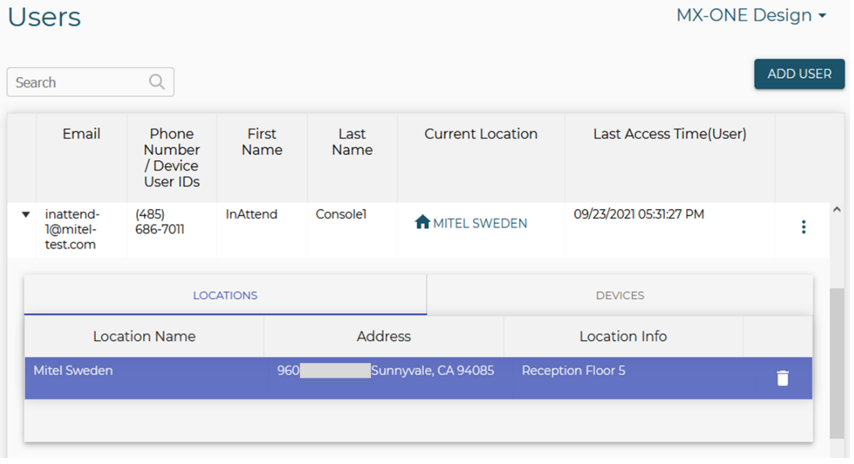
The System administrator needs to install and configure the MyE911 client in the InAttend´s computer. When the setup is completed and InAttend Client users set up their own locations setup (the civic address is entered) in the MyE911 client, and information in available the RedSky portal is shown as in the following sample setup.