Service Codes for Key Telephones
It is possible to change the service codes for Key Telephones if there are specific requests for the system. The service code is written -sc-xxx where the xxx stands for the corresponding number of the service.
Note: If the service codes are changed, other documents will not show the correct information for the system, for example the Application System Description document.
Alteration of Service Code
| Measure/Question | Observation/Comment | ||
|---|---|---|---|
|
1 |
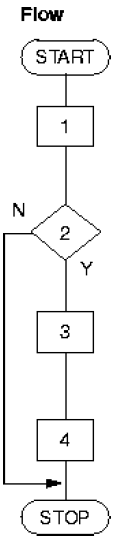
Print the existing service codes with the command number_print. |
-numbertype sc-xxx |
2 |
Key the command number_end to erase the service code that is to be altered. |
||
3 |
Key the command number_initiate to initiate the new service code. |
||
4 |
Verify the result from the printout ordered by the command number_print. |
Initiation of Service Code
| Measure/Question | Observation/Comment | ||
|---|---|---|---|
|
1 |
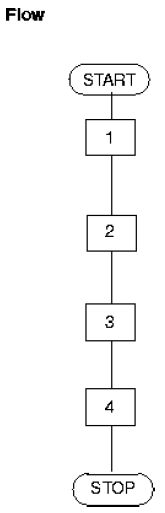
Print the existing service codes with the command number_print. |
-numbertype sc-xxx |
2 |
Does the service code that shall be initiated already exist in the system? |
The new service code has to be a not already used number. |
|
3 |
Is the service code procedure to be initiated included in the printout? |
||
4 |
Initiate one or more service codes by using the command number_initiate. |
||
5 |
Verify the result from the printout ordered by the command number_print. |
Erasure of Service Code
| Measure/Question | Observation/Comment | ||
|---|---|---|---|
|
1 |
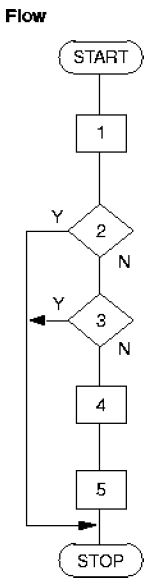
Print the existing service code with the command number_print. |
-numbertype sc-xxx |
2 |
Is the service code to be removed included in the printout? |
||
3 |
Key the command number_end to erase the service code. |
-numbertype sc-xxx |
|
4 |
Verify the result from the printout ordered by the command number_print. |