Login Methods for Mitel 6xxx SIP Terminals
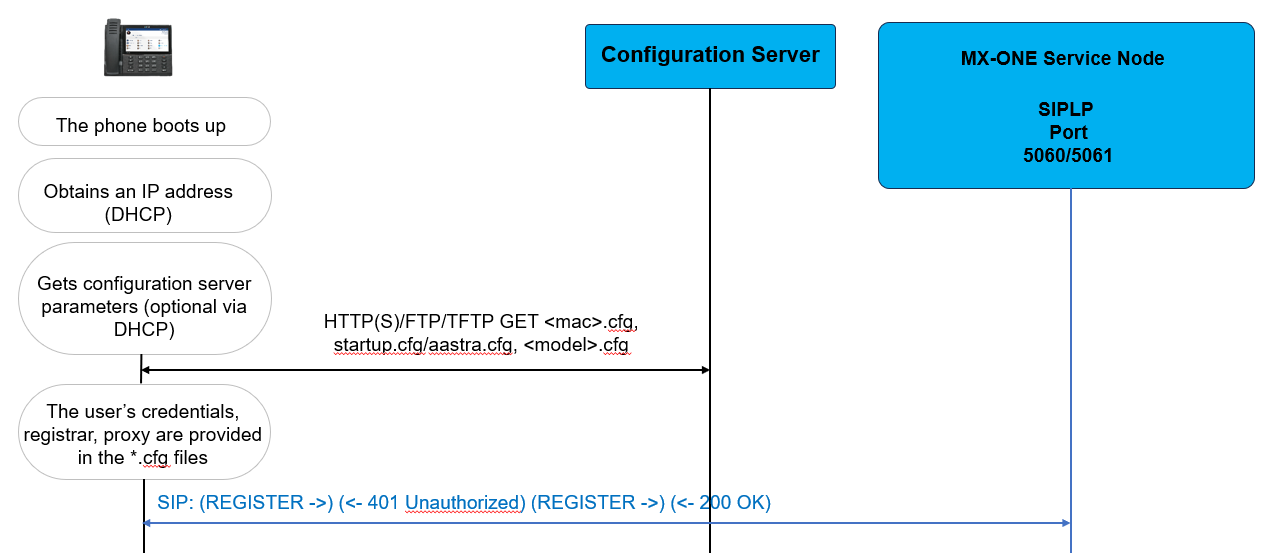
- Local configuration through Web GUI or <mac>.cfg. See Local Configuration.
- Login using XML.
- Login using VDP.
Local Configuration
Login using XML
This method uses XML API to control the Mitel 6xxx phone's configuration. A login key is configured in the <model>.cfg, startup.cfg, or <mac>.cfg files.
For example,
#Classic XML logon
softkey5 label:"LogOn"
softkey5 type:xml
softkey5 value:http://$$ACTIVEPROXY$$:22222/Logon
#when TLS is used:
#softkey5 value:https://$$ACTIVEPROXY$$:22223/Logon
softkey5 states:idle
softkey5 line:1When pressing the 'LogOn' key, the device calls a script in the service node, and a login dialog is presented, where the user has to enter the user number and password. When the authentication and authorization are successful, the service node pushes via XML payload in HTTP(S) 200 OK message the configuration data to the terminal (SIP Registrar, SIP authentication name, and SIP password). Subsequently, the terminal registers to the registrar with the user and password. After successful registration, the service node pushes via XML payload in SIP NOTIFY message other configuration data like user name and keys.
There is an alternative way to call the initial script for the login dialog, that is configuring the user action at terminal boot up. The following action can be configured in <model>.cfg, startup.cfg, or <mac>.cfg files:
action uri startup:http://$$ACTIVEPROXY$$:22222/Startup?user=$$SIPUSERNAME$$action uri startup:https://$$ACTIVEPROXY$$:22223/Startup?user=$$SIPUSERNAME$$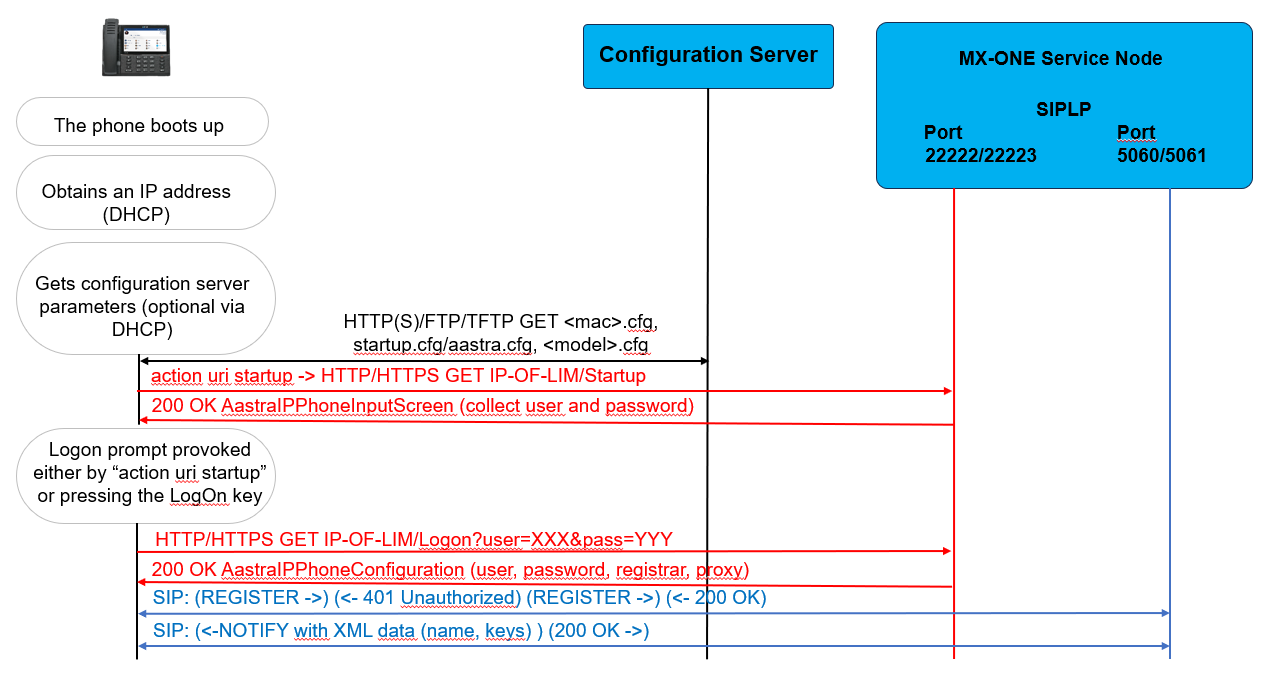
Login using VDP
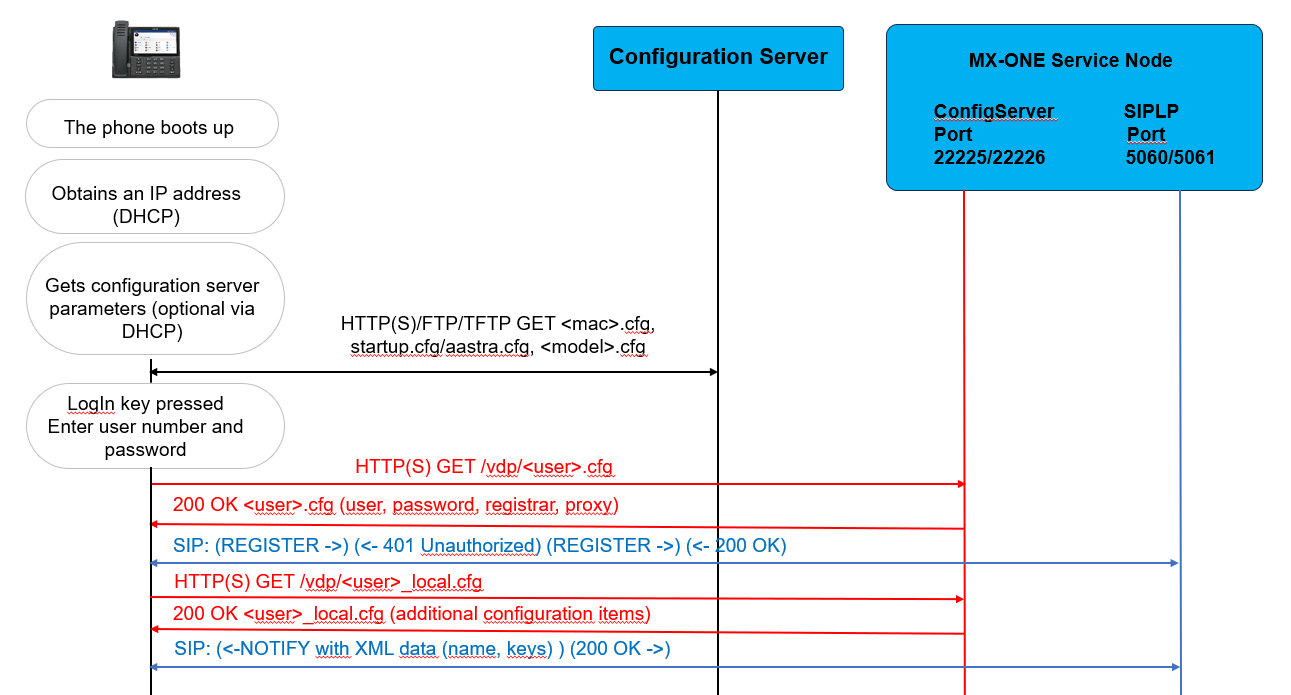
This method is based on the Visitor Desk Phone (VDP) feature; refer to the Mitel 6xxx Series SIP Phones Administrator Guide for basic information. At VDP Logon flow, the phone contacts a configuration server (defined by the user config url parameter) and downloads the subscriber's profile contained in the <user>.cfg and <user>_local.cfg files. To use this method, configure a login key in the <model>.cfg, startup.cfg, or <mac>.cfg files.
For example,
#Native login
softkey5 type:hotdesklogin
softkey5 states:idle
user config url:http://<lim IP>/limX.<mxone-domain>:22225/vdp
# when TLS is used, execute the following command:
user config url:https://<lim IP>/limX.<mxone-domain>:22226/vdp
In above example, the key selected is model dependent, in this example 6940 is used.
There are also other settings related to VDP; refer to the verified templates provided with the service node (current location: /etc/opt/eri_sn/mitelSIPphones/) or Mitel 6xxx Series SIP Phones Administrator Guide.
When VDP login is configured, XML logon or Startup URIs to ports 22222/22223 must not be used in any configuration file.
When pressing the 'LogIn' key, a login dialog is presented, where the user must enter the user number and password. The device contacts the service node, authenticates, and authorizes. The device gets <user>.cfg file from the service node, and this file has the configuration data needed for registration (SIP Registrar, SIP authentication name, SIP password, and SIP proxy). Subsequently, the terminal registers to the registrar with the user and password. After successful registration, the service node pushes via XML payload in a SIP NOTIFY message other configuration data like user name and keys.