Advanced
The Advanced section in phone settings lets you control how a phone behaves within the system. It includes options to define zone assignment, calling permissions, and how calls are handled under different conditions.
These settings help administrators manage access, enforce call restrictions, and customize
call routing based on service modes such as Day, Night, and alternative scenarios.
Note: This
section is optional.
To configure advanced options for a phone:
- Go to User Management > Users. The list of users is displayed.
- Select the user for whom you want to configure advanced settings.
- Go to Products and licenses > Settings. The User Configuration page is displayed.
- Select and expand Phone.
- Expand the Advanced section, and then configure the following options using the
respective drop-down lists or fields:
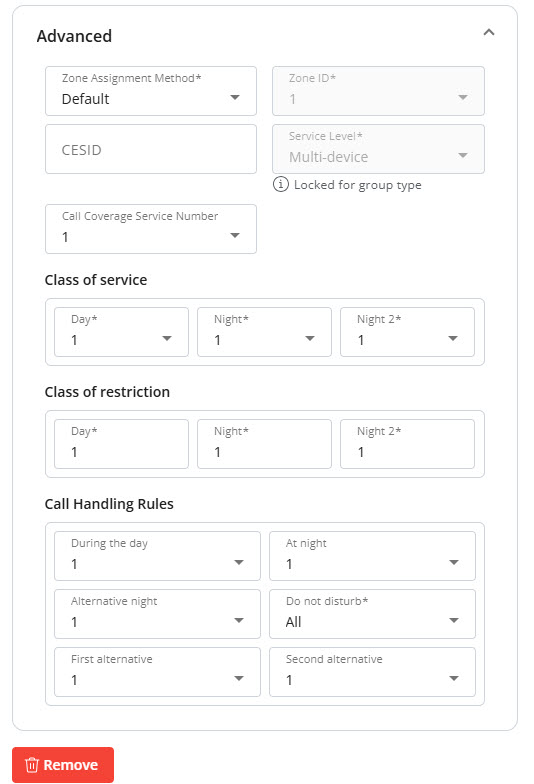
- Zone Assignment Method: Specifies how the system assigns a zone to the phone. The default method automatically applies a predefined zone configuration (for example, based on system or group settings), while other options may allow manual or rule-based assignment.
- Class of service: A system-generated, protected field that specifies the Class of Service (COS) number you want to edit or clear. The system supports up to 110 COS values. Reserve COS 100 for use by ARS when routing calls over Direct IP Routes.
- Class of restriction: Controls a station’s access to specific numbers. A station can have up to three COR assignments based on service mode: Day, Night, and Night2. You can also change the COR by using a Verified Account Code (VAC). A Verified Account Code temporarily grants access to features that are not normally available at a station. Enter the VAC before placing a call to override the station’s COR and Class of Service (COS). When the call ends, the station returns to its normal settings.
- Call Handling Rules: Defines how incoming calls are processed under different conditions (for example, during the day, at night, or when Do Not Disturb is active). Each setting determines the routing or treatment of calls, such as ringing, forwarding, or applying alternative handling paths.
- Click Save to apply the advanced configuration.
↑